I’m currently studying for my Meraki Solution Specialist Certification and one of the topics in the certification that is related to WiFi is how to configure and use Meraki WIPS solution – Air Marshal. Most Meraki indoor access points comes with a dedicated radio for full-time scanning used for Rogue AP containment and automatic RF optimization. In this post my goal is to try the function and look at some frame captures to understand the function a bit deeper. I currently have the following topology at my lab:

On the Meraki AP I will configure a company office SSID callled “WiFiSwede – Office”. On that AP I will also configure Air Marshal with the following configuration:

What this configuration actually does is that our Meraki AP will now monitor and watch for SSID’s Containing keyword “WiFiSwede”, and if find it will react. It will spoof its mac-address and send out deauthentication frames with the goal to interrupt traffic to the Rogue AP and force clients to leave. This function is often used in environment were companies have a legit SSID, but wants protection if someone tries to set up a close looking SSID and have users accidentally joining “wrong” SSID. When that happens, they have successfully performed an man-in-the middle attack making traffic go through wrong AP.
For my “Rogue AP” I have configured an Catalyst 9120 AP with EWC software running, and configured an SSID called “WiFiSwede – 0ffice”.
I can now see both SSIDs from my Mac:
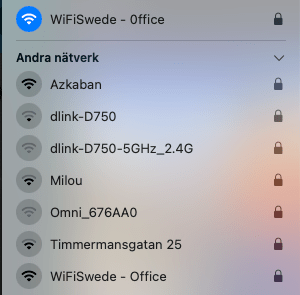
In Meraki I can also see the Airmarshal finding the matching SSID and applying action – contained.

This mean our legit Meraki AP should now be sending out deauthentication frames, but lets confirm with some packet capture:

First we can see regular beacon frames coming from both AP, we also see an deauthentication frame from source “Cisco_35:3c:ef” which are the rogue AP’s mac-address, this is because Air-Marshal is spoofing its Mac-adress to trick the client.
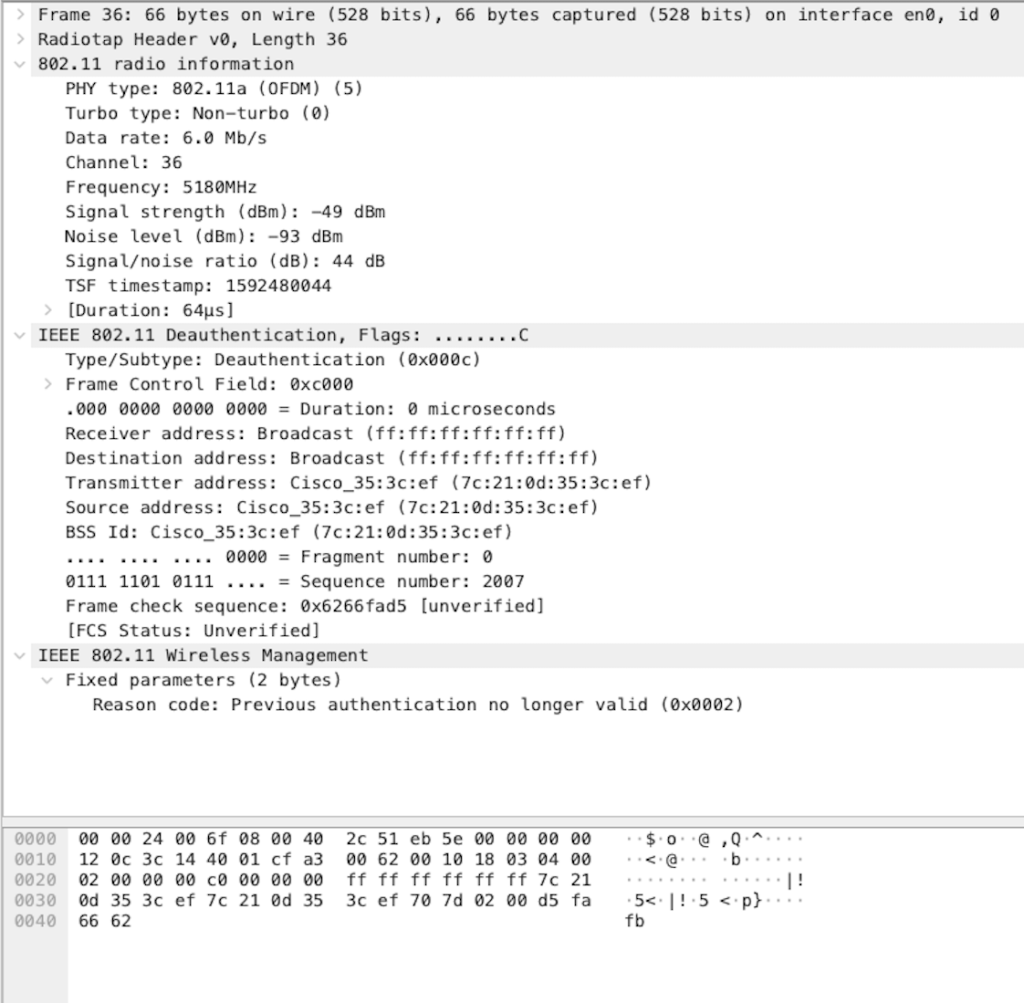
Conclusion: The function works and behave as expected, however after trying the “rogue ssid” on my mac and not getting disconnected, I learned that some clients nowadays can ignore deautchentication frames with a broadcast destination adress, making this function a bit limited. After trying the Air-Marshal function I had to read some documentations about the function and it seems like the function should be able to target the client with specifik source adress of the client. The Meraki AP I used in this LAB is an MR33 with current software version: MR 26.8.3. I will do an update of the software version to see if this function change. Will follow this up with a new blogg post shortly !
Update*
I just upgraded my Meraki AP and can see that it now start sending deauth frames with unicast address of the client connecting. However it looks like the client behave the same way and just ignoring the unicast deauthentication frame. If this is a expected behavior from the client we can really question the benefit of using this function and only introducing a lot of overhead traffic. Here is my pcap using filter wlan.fc.type_subtype == 12 (Only showing Deauthentication frames).

 WiFiSwede
Leave a comment