Maybe the first post from my CWAP training. Just quickly wanted to share the important concept “802.11 State Machine” and look at some frame exchanges. The 802.11-2016 standard defines four diffrent states of the client association:
State 1 – Unauthenticated and unassociated
State 2 – Authenticated, not associated
State 3 – Authenticated and associcated (Still missing RSN authentication)
State 4 – Authenticated and associated.
First of all, the 802.11 State Machine is the process when a station wants to join a Basic Service Set (BSS). Once the station has chosed a BSS the following frames are exchanged:
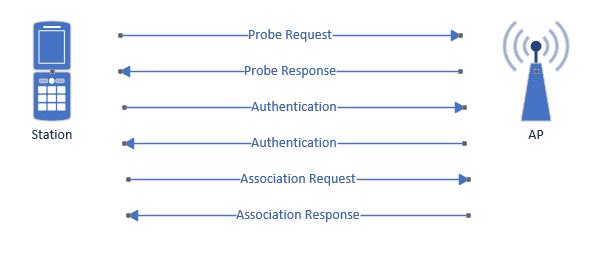
If no RSN security is used, the client is connected after these steps and have reached state 3. Lets have a look at this process thru Wireshark:

To get this view I used a filter for each frametype and then just rightclick “Mark Packet” then finishing with filter frame.marked == 1.
wlan.fc.type_subtype == 4 – Probe request
wlan.fc.type_subtype == 5 – Probe response
wlan.fc.type_subtype == 11 – Authentication
wlan.fc.type_subtype == 0 – Association request
wlan.fc.type_subtype == 1 – Association response
frame.marked == 1 – All market frames.
Looking at the last frame “Association Response” could be useful when troubleshooting a failed association, if successfull the Status code filed would look like this contaning Status Code (0x0000) (Successful) otherwise it will contain a failure cause code.
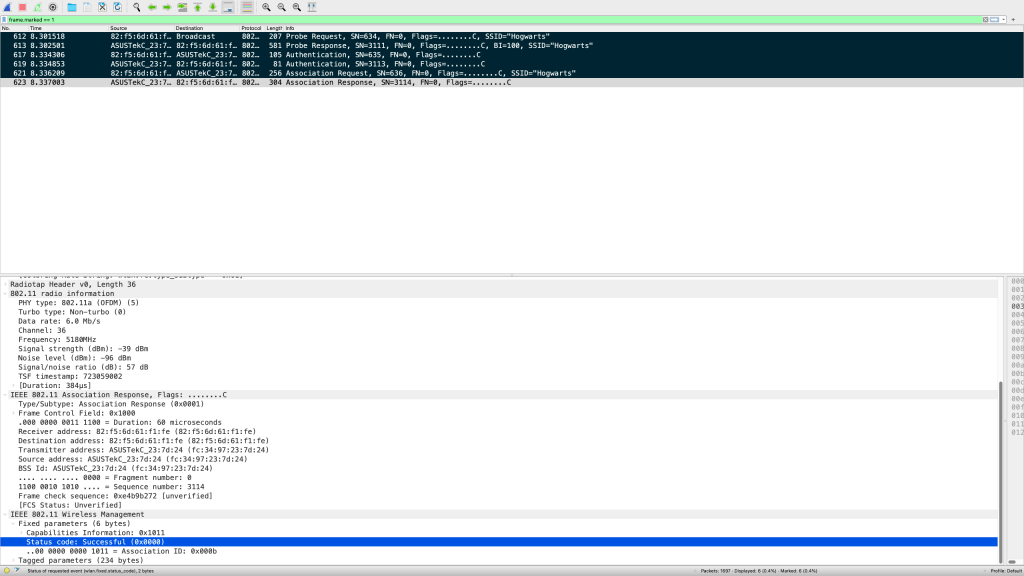
Important to remember is that all Security like Pre-shared Key or 802.1X happens after the 802.11 State Machine. And to reach State 4, the 4-way handshake also need to occur.
Reference: Certified Wireless Analysis Professional Study and Reference Guide.
 WiFiSwede
Leave a comment